Skip to Content
Start Free Trial

Horilla HR and CRM, Hosted for You

Open-source HR and CRM, run for you in the cloud, so your team can use them without running any servers. Choose HR, CRM, or both. Each workspace runs with its own application and database.

  • 30-day trial
  • Own application and database per workspace
  • Nightly backups of every active workspace

A card is required, and you can turn off auto-renewal before the trial ends.

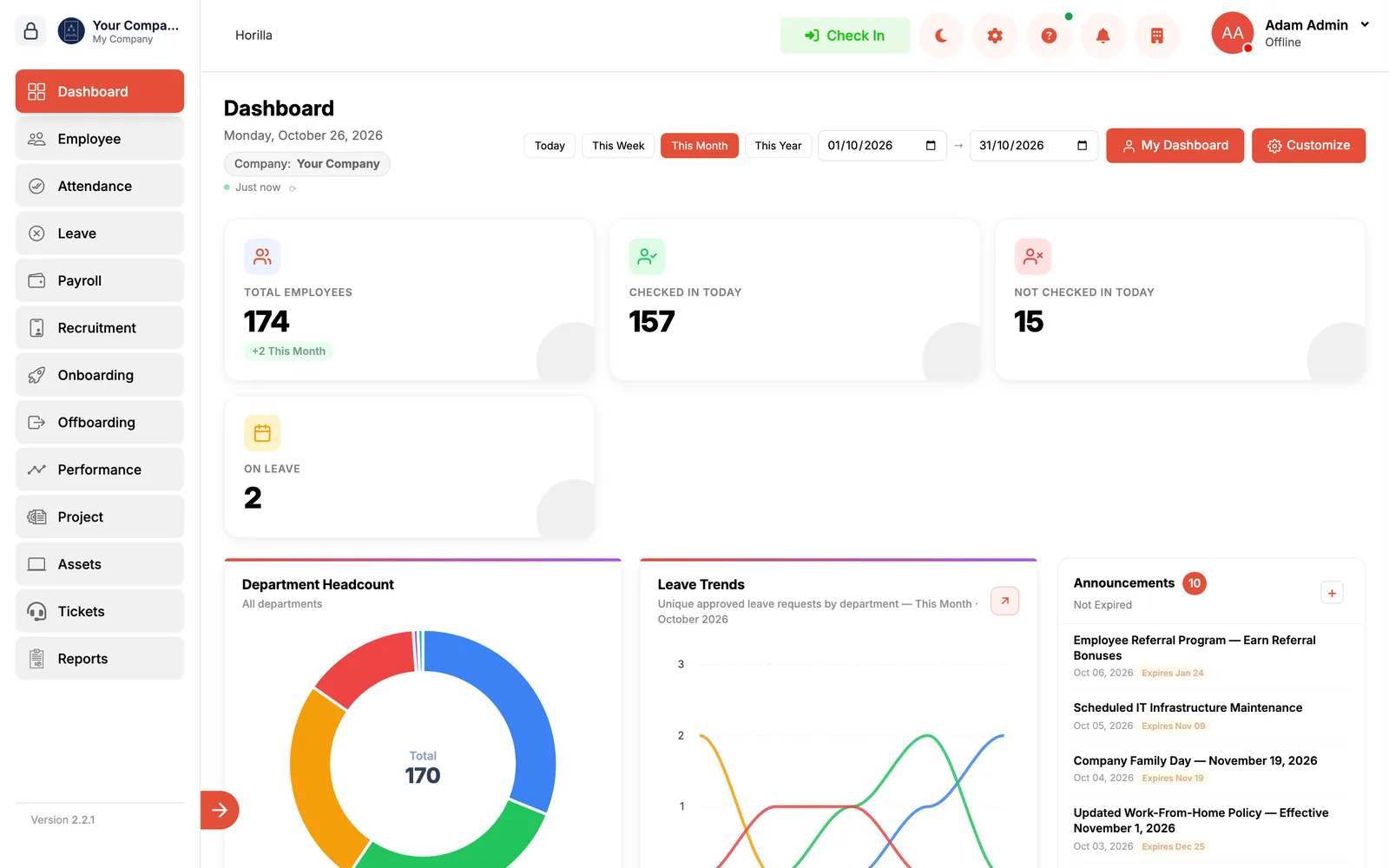
The Horilla HR dashboard with attendance, leave requests and open recruitment for the day
  • Who is in today, at a glance
  • Headcount and leave trends below
Sample data

HR and CRM

Horilla offers separate HR and CRM cloud services built for modern businesses. Each one gets its own workspace, so you can start with one and add the other later.

HR

Employee records, time, pay and hiring in one system, with roles and permissions for admins and managers.

Employee Management
Centralize employee records, roles, documents, and access control with real-time updates.
Attendance Management
Track employee attendance accurately using automated workflows, biometric sync, and mobile access.
Leave Management
Manage leave balances, approvals, and policies with automated leave tracking.
Payroll Processing
Run payroll with automated salary calculations and payslips.
Recruitment Management
Post jobs, track applicants, schedule interviews, and manage hiring workflows efficiently.
Onboarding
Automate onboarding with document collection, task assignments, and training workflows.
Performance Management
Run goal tracking, OKRs, and performance reviews with continuous feedback cycles.
Asset Management
Track company assets assigned to employees and maintain accountability with full history.
Employee Self-Service
Enable employees to manage requests, view information, and reduce HR admin workload.
Help Desk
Resolve employee queries through a centralized HR help desk and ticketing system.
Offboarding
Manage exits smoothly with clearance workflows, exit interviews, and documentation.
Illustration: an attendance ring, leave requests being approved, and a payroll run completing. The names and figures are sample data.

CRM

Leads, deals and customer history in one place, reachable from anywhere with role-based permissions.

Lead & Contact Management
Capture, organize, and manage leads and contacts with complete visibility into every customer interaction.
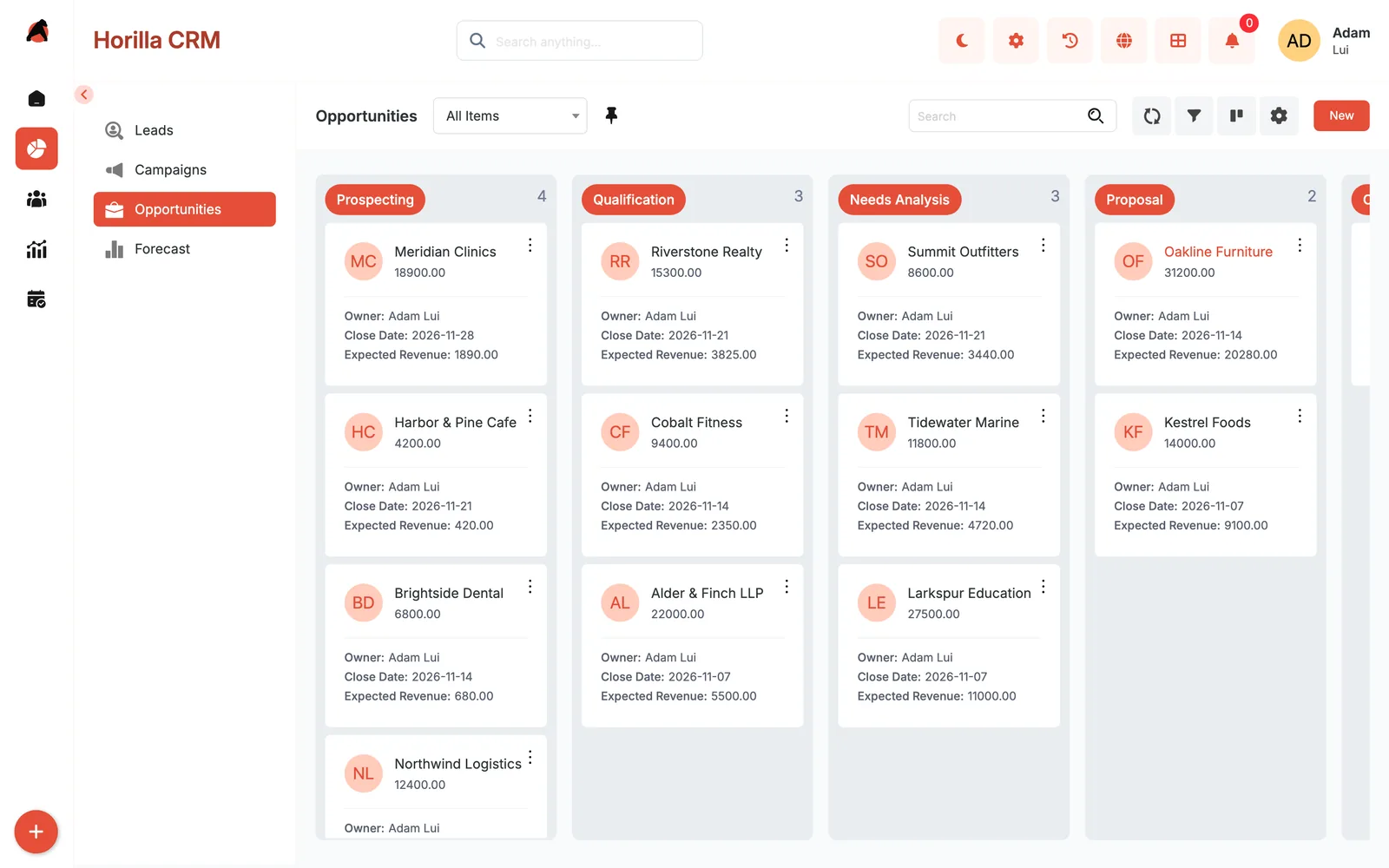
Sales Pipeline Tracking
Track deals through customizable pipelines and monitor progress at every stage to close faster.
Customer Interaction History
Maintain a complete history of calls, emails, and interactions for personalized engagement.
Cloud CRM Access
Access CRM data from anywhere, with role-based permissions.
Reports & Insights
Gain real-time insights into sales performance, conversions, and team productivity.
Scalable CRM Infrastructure
Add users as your team grows; you pay per user.
Illustration: a sales pipeline where a deal moves from prospecting to qualified to won. The names and figures are sample data.

Pricing

Simple per-user pricing, billed every 30 days. Not sure yet? Try the product first with a 30-day trial.

Plans compared
Plan detailMonthlyFree Trial
Price$7 per user, billed every 30 days$0 for 30 days
UsersAdd users any time, priced per user1 admin user with full access. Up to 10 employees with login access
ProductThe full Horilla product, with roles and permissions for admins and managersThe full Horilla product
RenewalRenews every 30 days until you turn it off30-day trial; card required; turn off auto-renewal before it ends and you won't be charged. Then $7 per user every 30 days
Choose a planGet StartedTry Free for 30 Days

Every active workspace has nightly backups and support by chat and email.

How Your Workspace Is Run

What happens behind the sign-in page, stated plainly.

Isolation
Each workspace runs with its own application and database.
Backups
Nightly backups of every active workspace.
Updates
Workspaces are updated in a night-time window, 01:00 to 05:00 workspace-local time.
Support
Support by chat and email.
Billing
Per user, billed every 30 days. Add users any time; a full period is charged for added users.
If Your Subscription Ends
We keep your data for at least 30 days (a trial) or 90 days (a paid workspace) after your subscription ends.
If You Delete a Workspace
A workspace you delete can be restored from your portal for 48 hours. After that it is deleted for good. We keep invoices and payment records as tax law requires.

Common Questions

What Happens After I Start the Trial?

Create an account, add a card, name your workspace, and watch it being set up. It is ready in a few minutes, and the getting started guide shows each step.

What Happens When the Trial Ends?

Your plan starts and you are charged per user every 30 days. To avoid the charge, turn off auto-renewal before the trial ends and the workspace stops instead.

Can I Run HR and CRM Together?

Yes. They are separate services, each in its own workspace, and several workspaces can sit under one account.

How Do I Turn Off Auto-Renewal?

In your portal, open Workspaces, choose the workspace, go to Plan & Seats, and switch Auto-Renew off. The workspace then stops when the period ends and you are not charged again.

Can I Get a Copy of My Data?

Write to support@horilla.com about copies of your workspace data. Billing records can be exported as a CSV file from Billing in your portal.

Can I Add Users Later?

Yes, any time. A full period is charged for added users.

How Do Updates Reach My Workspace?

Workspaces are updated in a night-time window, 01:00 to 05:00 in the workspace's own timezone.

Where Do I Get Help?

Chat and email. Use the chat in your portal, or write to support@horilla.com. The getting started guide walks through the first steps.

Connect Your Devices and Services

Connect attendance devices, social platforms, and other services.

Start With a 30-Day Trial

Create an account, add a card, and name your workspace. A workspace is ready in a few minutes. A card is required for the trial.